

Why Creating Great Stop-Motion Animations on a Phone Is Surprisingly Difficult
Stop-motion animation looks simple from the outside: move an object, take a photo, repeat.
In reality, producing smooth animation requires careful frame planning, precise camera control, consistent lighting, audio integration, and extensive editing.
When testing today's mobile stop-motion apps, several challenges appeared repeatedly:
Keeping movements consistent between frames
Previewing animation before rendering
Adding sound effects and voiceovers
Organizing longer projects with hundreds of frames
Exporting high-quality video without moving to desktop software
For this review, testing focused on five criteria:
Frame-by-frame capture tools
Onion-skin overlays
Editing workflow
Audio support
Overall suitability for complete mobile production
The Reality Check: What Actually Works?
If someone asked professional hobbyists which mobile stop-motion app dominates the category, Stop Motion Studio would almost certainly be the most common answer.
Multiple stop-motion communities continue to recommend it as the default starting point for beginners and serious creators alike.
During testing, its biggest strengths were:
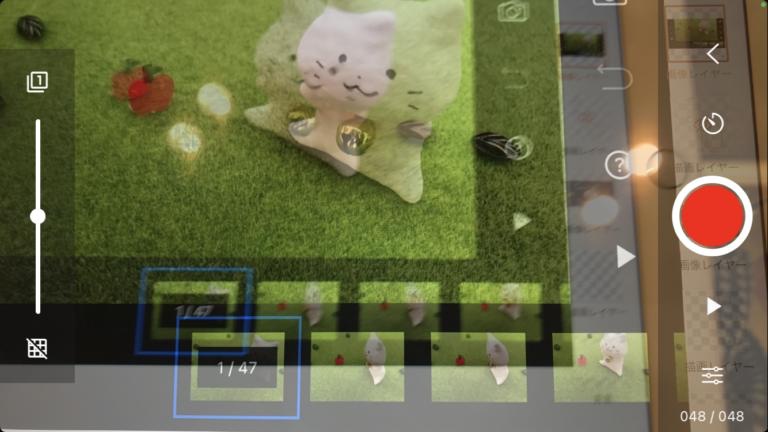
Excellent onion-skin overlays
Manual camera controls
Timeline editing
Audio recording
Green-screen support
4K export options
The app can handle everything from LEGO animations to advanced claymation projects.
Pros
Best all-around feature set
Professional workflow
Excellent onion-skin tools
Audio editing included
Available on both platforms
Cons
Interface can feel overwhelming initially
Some advanced features require Pro upgrade
Pricing
Free version available
Pro upgrade available as a one-time purchase (pricing varies by platform

The Reality Check: What Actually Works?
Life Lapse was clearly designed for creators who want fast results.
Rather than exposing every advanced animation control immediately, the app guides users through the production process.
During testing, its most useful features were:
Guided shooting modes
Built-in tutorials
Onion-skin overlays
Social-media-friendly exports
This makes it especially appealing to beginners and content creators.
Pros
Very beginner friendly
Helpful tutorials
Fast project creation
Clean interface
Cons
Less advanced than Stop Motion Studio
Subscription unlocks some premium tools
Pricing
Free version
Optional subscription
The Reality Check: What Actually Works?
iMotion has quietly remained one of the strongest iPhone-focused stop-motion tools.
The app supports:
Manual frame capture
Microphone-triggered capture
Time-lapse creation
Stop-motion projects
4K exports
Its camera controls are particularly impressive for creators who need consistent exposure and focus throughout a project.
Pros
Excellent camera controls
4K export support
Multiple capture methods
Professional-grade precision
Cons
iOS only
Smaller community than Stop Motion Studio
Pricing
Free
In-app purchases available
The Reality Check: What Actually Works?
PicPac remains one of Android's longest-running stop-motion apps.
Although its interface feels older than some competitors, it still offers a surprisingly capable workflow.
Testing showed particular strengths in:
Importing image sequences
Creating time-lapse projects
Recording narration
Adding music tracks
Producing quick animations directly on-device
The app also avoids requiring desktop software for most workflows.
Pros
Easy audio integration
Good image import tools
Lightweight app
Works well for educational projects
Cons
Android only
User interface feels dated
Last major update was some time ago
Pricing
Free version available
Pro upgrade available through in-app purchases

The Reality Check: What Actually Works?
StikBot Studio was originally built around the popular StikBot animation toys, but it has evolved into a capable entry-level stop-motion platform.
During testing, it proved especially useful for:
Young creators
Classroom projects
First-time animators
Quick social-media animations
The app includes tutorials and a simplified shooting workflow, making it less intimidating than many professional-focused alternatives. Community discussions continue to mention it as a viable beginner option.
Pros
Beginner friendly
Built-in tutorials
Cross-platform availability
Great for younger creators
Cons
Less advanced editing
Not ideal for professional productions
Pricing
Free
Optional in-app purchases
For creators who want to master the entire stop-motion production process on a mobile device, Stop Motion Studio remains the clear winner.
Its combination of:
Professional onion-skin tools
Camera controls
Timeline editing
Audio support
4K exports
makes it the closest thing to a desktop animation workflow available on a smartphone. Community recommendations continue to place it at the top of the mobile stop-motion category.